
Thames & Kosmos My Robotic Pet: Coding Chameleon
4.1Editor score
Uses color action cards for programming
Three unique play modes included
Winner of 2026 Educational Toy Award
Explore our expert guide comparing the top coding toys for kids in 2026 to find screen-free and app-based robots that teach programming logic and STEM skills.
Coding toys are transforming how children learn technology by turning abstract programming concepts into tangible, interactive play. These STEM tools encourage logical thinking, problem-solving, and creativity without requiring prior technical knowledge from young learners.
We evaluated ten top-rated coding robots based on educational value, ease of use, build quality, and engagement levels. Our comparison includes screen-free options for younger kids and app-connected models for advanced learners seeking deeper technical challenges.
Each pick highlights unique features like assembly requirements, coding methods, and skill progression paths. Note that availability and pricing may shift over time, so verify current details before purchasing to ensure you get the best value for your family.
4.1Editor score
4.6Editor score

4.6Editor score
This side-by-side comparison details key specifications for all ten models to help you match a robot to your child's age, experience level, and preferred learning style.




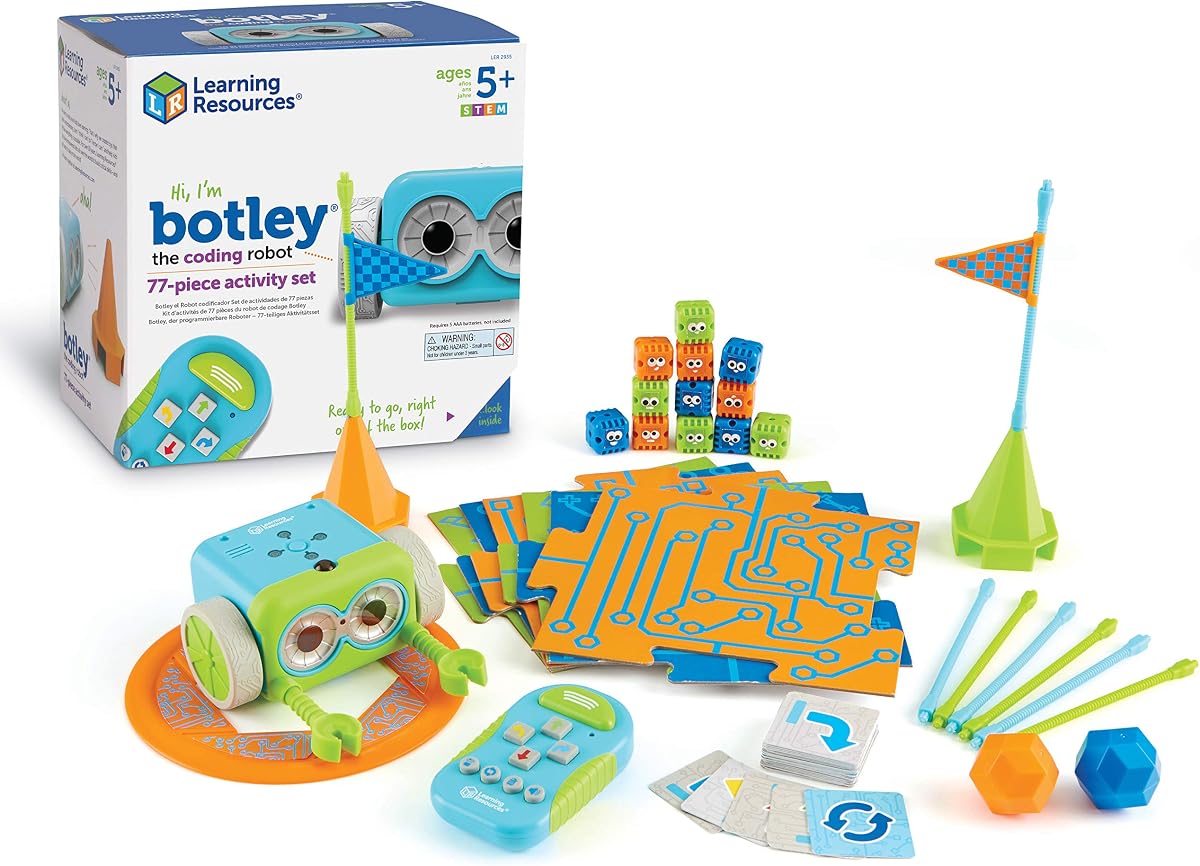
This comprehensive coding robot set holds an impressive 4.6-star rating from thousands of parents and educators. It teaches sequencing and problem-solving through playful physical play without needing tablets or phones.
We may earn a commission when you buy through this link, at no additional cost to you.
Botley stands out for its advanced object detection and black-line path following. The included remote programmer allows kids to input complex loop commands and multi-step sequences easily.
While the set is highly durable, it does require seven AAA batteries which are not included in the box. Users should budget for high-quality batteries to ensure consistent performance during play.
It is an ideal choice for early learners aged 5 and up who are ready to explore coding logic. The combination of physical obstacles and remote control makes it a top pick for home or classroom use.
Botley can detect objects in front of him and automatically avoid them, teaching cause-and-effect logic.
Kids can program looping sequences that repeat actions, introducing fundamental programming structures like loops and branches.
We may earn a commission when you buy through this link, at no additional cost to you.
This unique robotic reptile kit offers an affordable way for children aged 8 and up to explore coding and engineering basics. It won the 2026 Educational Toy of the Year Award for its innovative design.
We may earn a commission when you buy through this link, at no additional cost to you.
The chameleon uses physical colored action cards to program movements instead of screens or apps. Its sensors allow it to camouflage and change colors based on its surroundings in Wild Mode.
While it is a budget-friendly option, assembly takes time and requires adult supervision for younger children. The manual is comprehensive but the coding logic is less complex than app-based systems.
This robot is perfect for families seeking a tactile, screen-free STEM experience. It balances fun and education well, making it a great starting point for budding roboticists.
The robot utilizes color sensors to react to environmental inputs, teaching how machines interact with physical data.
Children learn about torque, joints, and robotics assembly while building the 15-inch mechanical reptile model.
We may earn a commission when you buy through this link, at no additional cost to you.
Dash is a premium robot widely used in schools globally to teach STEM skills. It boasts a 4.6-star rating and offers a seamless experience with no assembly required.
We may earn a commission when you buy through this link, at no additional cost to you.
Kids can sing, dance, and navigate obstacles using voice commands or app-based coding. The Blockly app allows for complex variable and loop programming suitable for older kids.
The higher price reflects its durability and extensive software ecosystem. It does require a tablet or smartphone for coding, which may not suit strictly screen-free preferences.
This is the top choice for families who want a robust, app-enabled robot for long-term learning. Its school-proven track record makes it a reliable investment for education.
Dash connects to five different apps including Blockly and Wonder to provide varying levels of coding complexity.
The robot responds to voice commands and detects obstacles, allowing for dynamic and interactive storytelling play.
We may earn a commission when you buy through this link, at no additional cost to you.
mBot is designed for kids aged 8 to 12 who want to learn electronics and programming simultaneously. It holds a 4.6-star rating and is praised for its clear instructions.
We may earn a commission when you buy through this link, at no additional cost to you.
The metal construction ensures durability while the system supports both Scratch and Arduino coding environments. It is also compatible with over 100 electronic modules for expansion.
Users must provide batteries for the robot and controller as they are not included. Assembly is simple but requires care to ensure mechanical parts are aligned correctly.
This kit is ideal for young tinkerers looking to move beyond basic buttons. The open-source system allows for endless customization as skills grow.
Kids can connect to 100 electronic modules and 500 parts to create custom robotic configurations.
The mBlock software matches hardware functions with coding blocks to help visualize programming concepts clearly.
We may earn a commission when you buy through this link, at no additional cost to you.
Sphero Mini packs powerful educational features into a tiny ball the size of a ping pong ball. It earns a 4.6-star rating for its versatility in both coding and gaming.
We may earn a commission when you buy through this link, at no additional cost to you.
Users can draw paths on their screen or write JavaScript to control the robot. It also functions as a controller for arcade games which keeps engagement high.
The battery provides about one hour of active play which may require frequent charging for long sessions. Its small size means it can roll under furniture easily.
This robot is perfect for travel or small spaces where larger robots won't fit. The balance of coding and entertainment makes it a great choice for teens.
Kids can choose from Joystick Slingshot or Tilt modes to drive the ball without writing code first.
The app includes games like shooting through space or smashing bricks using the robot as a controller.
We may earn a commission when you buy through this link, at no additional cost to you.
This activity set introduces early learners aged 4 and up to programming basics through a charming mouse character. It has a 4.5-star rating and focuses on screen-free learning.
We may earn a commission when you buy through this link, at no additional cost to you.
Children program Colby the mouse using buttons to navigate mazes built from the included grids and walls. This strengthens sequencing and directional understanding effectively.
The set requires three AAA batteries which are not included. The buttons can sometimes be tricky for children with larger hands to press quickly.
It is an excellent introductory tool for preschoolers or early elementary students. The simplicity allows them to grasp coding logic without overwhelming technical details.
Programmers strengthen sequencing logic and directional understanding as they plan the mouse navigation routes.
Teachers can use the maze grids for repeatable activities during classroom rotations and STEM lab sessions.
We may earn a commission when you buy through this link, at no additional cost to you.
Mech-5 is a one-of-a-kind mechanical coding robot for kids aged 10 and up who want to build their own device. It holds a 4.5-star rating and focuses on engineering fundamentals.
We may earn a commission when you buy through this link, at no additional cost to you.
The robot uses a coding wheel system where kids snap buttons to program actions like throwing lifting or kicking. This hands-on approach teaches mechanical engineering principles deeply.
Assembly requires multiple hours and careful attention to detail. It is not a quick toy but a true STEM project that rewards patience and effort.
This kit is perfect for older kids interested in mechanics and engineering. The unique ability to perform physical tasks sets it apart from standard robots.
Users snap coding buttons onto a wheel to sequence actions which simplifies coding for mechanical robots.
Building the kit teaches gear ratios and structural integrity alongside basic programming logic.
We may earn a commission when you buy through this link, at no additional cost to you.
The Evo Entry Kit introduces kids to coding through color codes and online platforms. It has a 4.6-star rating and offers five skill levels from beginner to master.
We may earn a commission when you buy through this link, at no additional cost to you.
Kids draw lines with the included markers to command the robot. It also supports Ozobot Blockly for digital coding providing a hybrid learning experience.
The price is higher than many alternatives but the kit includes over 700 free educational lessons. The durable case keeps markers and robot organized for use.
This robot is ideal for educators and parents wanting a flexible tool that grows with the child. The combination of analog and digital coding is unique.
The robot reads colored patterns on paper to execute commands teaching visual programming without screens.
Access to 700 lessons enhances critical thinking skills and integrates STEM with core subjects.
We may earn a commission when you buy through this link, at no additional cost to you.
This upgraded version of the classic Botley adds new object-sensing reactions and 45-degree turns. It maintains a strong 4.5-star rating and continues to be screen-free.
We may earn a commission when you buy through this link, at no additional cost to you.
Kids can build custom mazes using the included stackable obstacle pieces. The robot features 16 secret code combinations that add mystery and exploration to play.
The remote programmer requires two AAA batteries and the robot requires three batteries which are not included. This adds to the initial setup costs before play.
This set is a solid choice for children ready for more complex coding challenges. The new reactions make the robot feel more intelligent and interactive.
Botley can detect objects in its path and react which adds a layer of logic to obstacle courses.
16 secret codes offer open-ended discovery allowing kids to find new features through experimentation.
We may earn a commission when you buy through this link, at no additional cost to you.
TaleBot Pro is designed specifically for toddlers aged 3 to 5 to teach early coding concepts through storytelling. It boasts a high 4.7-star rating for its engaging voice feedback.
We may earn a commission when you buy through this link, at no additional cost to you.
Kids can record voice commands to make the robot move and play stories. The interactive map connects with Lego blocks for extended creative play.
The coding is simplified to buttons and sequences appropriate for very young children. It is not as technically advanced as older kids robots but fits its age group perfectly.
This robot is an excellent choice for early learning and language development. The storytelling aspect makes it a favorite for imaginative children.
The robot provides instant voice feedback to encourage and guide children during their play sessions.
Children can record their own voices and bring tales to life through the interactive map.
We may earn a commission when you buy through this link, at no additional cost to you.
Selecting the right coding toy depends on age, learning goals, and budget. Here are key factors to consider before buying.
Most coding robots have specific age ranges based on the complexity of the interface. Younger children need simple buttons while older kids can handle apps or complex assemblies.
Always match the toy to the child's motor skills and attention span for the best experience.
Some robots work without screens using physical cards or remotes which is great for limiting digital exposure. App-based robots offer deeper coding features but require a tablet.
Choose screen-free if you want to minimize screen time or app-based if you want advanced programming lessons.
Some kits like mBot or Mech-5 require assembly which teaches engineering skills but takes time. Others like Dash come fully assembled for immediate play.
Decide if you want a building project or a ready-to-go toy before purchasing.
Robots use various methods like color cards, button sequences, or drag-and-drop blocks. Some even support text coding like JavaScript for teens.
Pick a method that matches the child's current skill level and learning style.
Coding robots consume significant power and some require specific batteries not included in the box. Check battery life to ensure long play sessions.
Consider rechargeable models to reduce long-term costs and waste.
Many brands offer free lesson plans and guides to maximize the toy's value. Kits like Ozobot Evo include thousands of lessons for structured learning.
Look for robots with strong support materials if you plan to use them for homeschooling.
Some robots allow you to add sensors or connect to other building blocks like Lego. This keeps the toy relevant as skills improve.
An expandable system is a better long-term investment than a single-use device.
Kids can be rough on toys so look for sturdy construction and positive reviews on longevity. Brands offering warranties provide extra peace of mind.
Invest in a model with a track record of durability for shared household use.
First always charge the robot or install fresh batteries before the first session to avoid frustration. Follow the manual's assembly steps carefully if building is required.
Second start with the simplest coding challenges and gradually increase difficulty as confidence grows. Use the included activity cards or app tutorials to guide the learning.
Third store the robot and accessories in a dry place to protect electronic components. Clean sensors gently with a soft cloth and avoid letting liquids touch the device.
Yes coding toys teach foundational concepts like sequencing and loops that mirror real programming. App-based models even introduce text coding which prepares kids for professional development.
Screen-free toys reduce digital exposure and focus on logic but app-based robots offer deeper features. The best choice depends on your family's goals for technology use.
Children can start with simple button robots as young as age 3. More complex coding robots are suitable for ages 8 and up when they can handle abstract logic.
Battery life varies by model but many offer one to five hours of active play. Using rechargeable batteries helps reduce long-term costs and waste significantly.
Yes many robots like Botley and Dash support multi-user play which encourages collaboration and shared problem-solving. The robot can take commands from different users easily.
Assembly ranges from easy snapping for younger kids to detailed builds for teens. Older children can often complete simple kits alone while adults may help younger ones.
We highlighted top picks like Botley Dash and the Coding Chameleon to suit various needs and budgets. Each model offers unique ways to learn logic and engineering without overwhelming kids.
Prioritize screen-free options if you want to limit tech exposure but choose app-based for advanced learners. Always check the age range to ensure the toy is a good match.
Prices and stock fluctuate so compare the current offers before making your final decision. The right coding toy can spark a lifelong interest in technology and creativity.