
TECKNET Ergonomic Mouse 4800 DPI Wireless Bluetooth Vertical
4.4Editor score
Six adjustable DPI levels
Seamless three device switch
Silent click technology
This guide compares the top ergonomic mice for wrist pain based on comfort, design, connectivity, and user feedback to help you find relief.
Finding the right mouse can transform your workday and protect your long-term health. Ergonomic designs help align your hand naturally, reducing strain on wrists and forearms during extended computer sessions.
We analyzed ten highly rated vertical and ergonomic mice focusing on comfort, build quality, and connectivity. Our selection includes options for various hand sizes and budgets to suit different needs.
Each pick highlights key features, pros, and cons to guide your decision. Note that product availability and pricing may change, so check current listings before purchasing your new device.
4.4Editor score

4.4Editor score

4.4Editor score
The following table provides a quick side-by-side comparison of the top ten ergonomic mice. Review key specifications to find the perfect fit for your workspace and needs.



The Logitech Lift Vertical Ergonomic Wireless Mouse offers exceptional comfort with its 57-degree vertical design. Rated 4.4 stars by users, it provides a natural handshake position that reduces forearm strain.
We may earn a commission when you buy through this link, at no additional cost to you.
Its ergonomic certification ensures it meets strict guidelines for comfort. Features like whisper-quiet clicks and a customizable SmartWheel enhance productivity without disturbing others around you.
While the price is higher than budget options, the build quality and battery life justify the cost. Some users may need a few days to adjust to the vertical shape.
Ideal for professionals seeking long-term wrist relief, this mouse delivers reliable performance. Its wireless connectivity and ergonomic support make it a top choice for daily work.
The 57-degree angle promotes a natural handshake position aligning your wrist and forearm to reduce twisting.
Whisper-quiet clicks and a smooth SmartWheel allow focused work without disrupting shared office environments.
We may earn a commission when you buy through this link, at no additional cost to you.
The Anker 2.4G Wireless Ergonomic Mouse delivers solid performance with a plug-and-play USB receiver. Its vertical structure promotes a neutral wrist position to reduce strain.
We may earn a commission when you buy through this link, at no additional cost to you.
Featuring adjustable DPI up to 1600, it offers precise tracking on various surfaces. The included next and previous buttons streamline web browsing for enhanced productivity.
Although it lacks Bluetooth and has audible clicks, its simplicity and reliability appeal to many users. The power-saving mode helps extend battery life significantly.
Best for those preferring straightforward connectivity, this mouse is a practical choice. It provides essential ergonomic benefits without complex pairing or setup.
Built-in next and previous buttons allow effortless page navigation for browsing enthusiasts and researchers.
Automatic sleep mode after inactivity conserves power ensuring longer battery usage between replacements.
We may earn a commission when you buy through this link, at no additional cost to you.
The TECKNET Ergonomic Mouse offers impressive features at a budget-friendly price. With Bluetooth and USB connectivity, it supports seamless switching between three devices.
We may earn a commission when you buy through this link, at no additional cost to you.
Its high 4800 DPI and silent left and right clicks make it versatile for both work and quiet environments. The vertical design reduces wrist pressure effectively.
While side buttons do not function on macOS, the core experience remains strong. It requires AAA batteries, which are not included in the package.
Perfect for cost-conscious buyers needing multi-device support, this mouse delivers high performance. Its silent operation and ergonomic shape are standout advantages.
Six adjustable DPI levels ranging from 800 to 4800 ensure smooth tracking on any surface.
Bluetooth and USB modes allow quick switching between devices improving workflow efficiency.
We may earn a commission when you buy through this link, at no additional cost to you.
The UGREEN Ergonomic Wireless Mouse features quiet-click buttons ideal for shared workspaces. Its vertical design reduces wrist rotation and muscle strain effectively.
We may earn a commission when you buy through this link, at no additional cost to you.
With PTFE glide feet, movement is smooth and friction-free. Four adjustable DPI levels provide flexibility for different tasks from precise editing to fast scrolling.
Although it uses a single AA battery, the smart sleep mode extends usage time. Some users might prefer more granular DPI control.
Recommended for quiet office environments, this mouse balances comfort and functionality. Its dual wireless options ensure compatibility across various devices.
Durable PTFE feet reduce friction ensuring effortless cursor movement on any desk surface.
Bluetooth and 2.4G modes allow easy switching between devices with up to 10 meters range.
We may earn a commission when you buy through this link, at no additional cost to you.
Designed specifically for small to medium hands under 7.5 inches, the ProtoArc EM11 NL reduces wrist strain effectively. Its vertical alignment promotes natural grip comfort.
We may earn a commission when you buy through this link, at no additional cost to you.
With a built-in rechargeable battery, you avoid disposable battery costs. It supports multiple devices via Bluetooth and USB, making it versatile for hybrid workers.
Some buttons are not programmable and forward back functions may not work on Mac. However, the ergonomic benefits outweigh these minor limitations for most users.
Best for users with smaller hands seeking rechargeability, this mouse offers great comfort. Its silent clicks and multi-device support enhance daily usability.
Tailored dimensions ensure a secure comfortable grip for users with smaller hand sizes.
Built-in battery and USB-C charging eliminate the need for frequent battery replacements.
We may earn a commission when you buy through this link, at no additional cost to you.
The Lekvey Ergonomic Mouse features a high-capacity rechargeable battery offering over 150 hours of use. Its ergonomic structure promotes neutral wrist positioning.
We may earn a commission when you buy through this link, at no additional cost to you.
With three DPI levels, users can adjust sensitivity easily. The plug-and-play USB receiver ensures instant connectivity without pairing delays.
While it lacks Bluetooth and has a modest DPI range, its build quality and battery performance impress. Many users find relief from wrist pain quickly.
Ideal for those needing reliable rechargeable performance, this mouse is a solid mid-range choice. Its ergonomic shape and warranty add long-term value.
High-capacity battery provides over 150 hours of continuous use reducing charging frequency.
Nano USB receiver ensures instant plug-and-play connection without software installation.
We may earn a commission when you buy through this link, at no additional cost to you.
The TECKNET Ergonomic Mouse features whisper-quiet clicks ideal for distraction-free environments. Its 52-degree angle reduces strain during extended sessions.
We may earn a commission when you buy through this link, at no additional cost to you.
With 4800 DPI and a 600mAh battery, it offers precision and long-lasting power. Bluetooth 5.0 ensures stable connections without lag.
Although forward and back buttons lack Mac support, the core performance remains excellent. Users appreciate the silent operation and durable build.
Perfect for quiet offices and professionals needing precision, this mouse excels. Its ergonomic design and silent features make it a standout choice.
Advanced silent click technology reduces noise by 99 percent for peaceful workspaces.
Adjustable DPI up to 4800 ensures accuracy for detailed tasks and fast scrolling.
We may earn a commission when you buy through this link, at no additional cost to you.
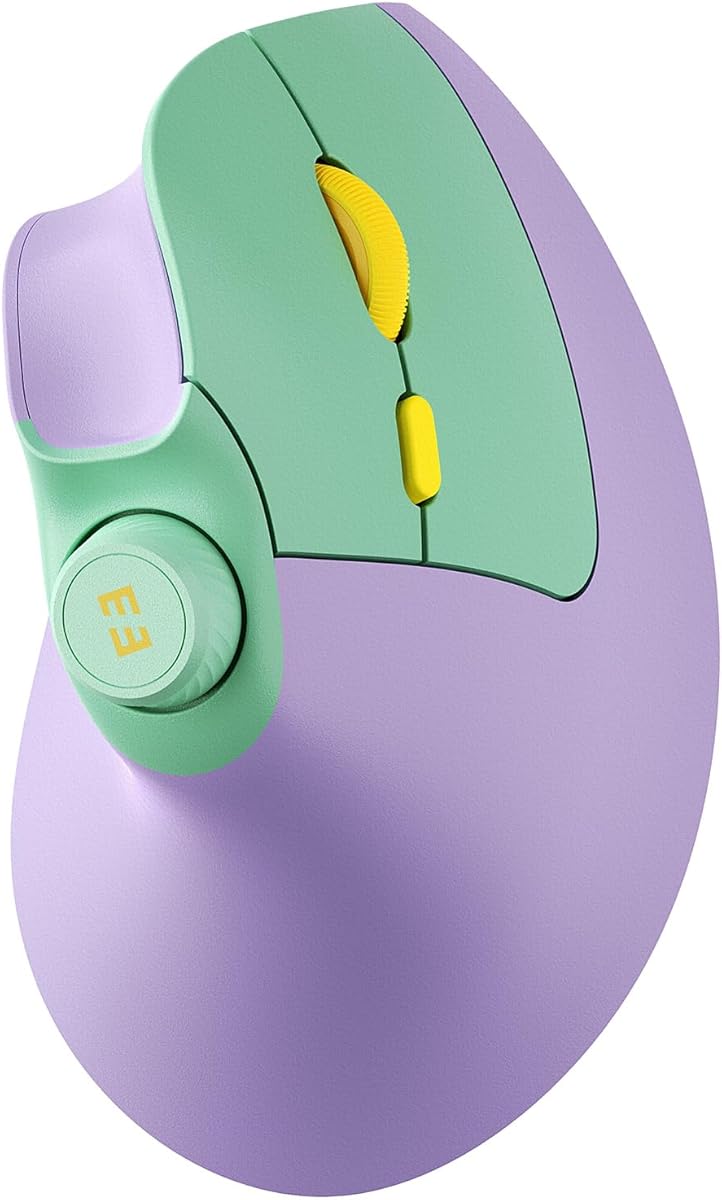
The seenda MOU-302 includes a built-in volume knob for convenient media control. Its vertical design promotes natural wrist alignment reducing strain.
We may earn a commission when you buy through this link, at no additional cost to you.
With silent clicks and adjustable DPI, it fits both work and shared environments. Three device connectivity allows easy switching between laptop tablet and desktop.
Although it has limited DPI steps and requires a separate USB-C cable, the volume feature is highly valued. Battery life remains strong with USB-C charging.
Best for streamers and multitaskers, this mouse combines ergonomics with media shortcuts. Its versatile connectivity and silent operation enhance daily productivity.
Integrated volume knob lets you adjust sound without switching windows saving time.
Simultaneous connection to three devices via Bluetooth and USB improves workflow.
We may earn a commission when you buy through this link, at no additional cost to you.
The Logitech MX Vertical is a premium ergonomic mouse designed with expert ergonomists. Its 57-degree vertical angle reduces pressure on your wrist significantly.
We may earn a commission when you buy through this link, at no additional cost to you.
Featuring a 4000 DPI sensor and cursor speed switch, it ensures accuracy and versatility. The textured rubber surface guarantees a natural comfortable grip.
While more expensive and better suited for larger hands, the performance and comfort justify the investment. Users report reduced muscle strain and improved posture.
Best for professionals demanding top-tier ergonomics and precision, this mouse excels. Its advanced features and certified design make it a long-term solution.
4000 DPI sensor provides 4 times less hand movement compared to standard mice.
Rubber surface ensures secure natural grip reducing slippage and strain.
We may earn a commission when you buy through this link, at no additional cost to you.
The TECKNET 2.4G Wireless Ergonomic Vertical Mouse features a 60-degree vertical grip reducing wrist strain. Its rechargeable battery ensures cost-free usage over time.
We may earn a commission when you buy through this link, at no additional cost to you.
Six programmable buttons and five DPI levels offer flexible workflow customization. Silent left and right clicks maintain focus without noise.
Though it lacks Bluetooth and requires a brief adjustment period, the stability and battery life impress. Many users adapt quickly and find pain relief.
Best for users needing USB reliability and programmable options, this mouse is ideal. Its ergonomic shape and rechargeability provide practical long-term benefits.
Six buttons allow customization of shortcuts reducing repetitive click fatigue.
Silent button design ensures a distraction-free workspace for deep concentration.
We may earn a commission when you buy through this link, at no additional cost to you.
Choosing the right ergonomic mouse depends on comfort design and usability. Here are key factors to consider before making your purchase.
The angle of the mouse determines how your wrist aligns during use. A 57 to 60-degree vertical design encourages a natural handshake posture reducing forearm twisting.
Look for models with angles certified by ergonomists to ensure effective strain reduction.
Not all ergonomic mice fit every hand. Smaller users should seek compact models while larger hands may need extended shapes for proper support.
Check product dimensions and manufacturer recommendations to ensure the mouse fits comfortably.
Choose between Bluetooth and USB wireless receivers based on your device ports. Bluetooth saves USB ports while USB receivers offer stable plug-and-play connections.
Consider multi-device pairing if you switch between computers or tablets frequently.
Rechargeable models eliminate battery waste but may need occasional charging. Battery-powered mice often last longer per charge but require replacements.
Evaluate usage time versus convenience to select the best power source for your workflow.
Adjustable DPI allows you to switch between slow precise moves and fast scrolling. Look for ranges from 800 to 4000 or higher to suit varied tasks.
Higher DPI ensures smooth tracking on different surfaces without lag or jitter.
Programmable buttons can boost efficiency by assigning shortcuts to thumb areas. Ensure compatibility with your operating system before purchasing.
A practical layout should include essential navigation buttons without cluttering the interface.
Quiet-click technology minimizes noise distractions especially in shared offices or libraries. Not all buttons may be silent so check descriptions carefully.
Silent operation enhances focus and ensures comfort during long work sessions.
Durability varies across brands. Look for models with long warranties and positive user feedback regarding longevity.
A solid warranty reflects confidence in product quality and protects your investment.
Start by adjusting your chair height so your elbow aligns with the mouse level. This posture reduces shoulder and wrist strain during use.
Allow yourself a week to adapt to the vertical shape. Mix normal and ergonomic usage until your muscles adjust to the new position.
Keep the sensor surface clean and update firmware regularly. A clean mouse ensures smooth tracking and extends device lifespan.
Yes, ergonomic mice align your wrist in a neutral handshake position reducing forearm twist. Many users report less pain after a short adaptation period.
Most models are designed for right-handed use only. Left-handed users should check for symmetrical designs or ambidextrous models to ensure proper support.
Adjustment typically takes three to ten days. Your muscles may resist initially but comfort improves significantly once you adapt to the shape.
Some ergonomic mice offer high DPI suitable for gaming. While not optimized for fast reflexes they can handle casual gaming sessions comfortably.
Yes, most ergonomic mice work alongside trackpads. You can use the mouse for detailed work and the trackpad for navigation as needed.
Use a soft lint-free cloth to wipe the surface. Avoid harsh chemicals and keep the sensor lens clean to maintain tracking accuracy.
Bluetooth saves ports and reduces cable clutter but USB offers stable connections. Choose based on your device's port availability and preference.
Most models come with one to three-year warranties. Check manufacturer policies for coverage on defects or connectivity issues.
The ten ergonomic mice reviewed provide diverse solutions for wrist pain and comfort. Top picks include the Logitech Lift TECKNET Wireless and Logitech MX Vertical.
Prioritize models matching your hand size and connectivity needs. A well-fitted mouse offers lasting relief and improves daily workflow.
Always verify current availability and pricing before purchasing. Regular updates ensure you get the latest features and best value.