
Rongta Bluetooth Shipping Label Printer
4.0Editor score
Affordable price point
Automatic label identification
Wireless Bluetooth connectivity
This guide compares the top Dhl label printer options for small businesses, focusing on speed, connectivity, compatibility with shipping platforms, and overall
Finding the right Dhl label printer can streamline your shipping workflow significantly. Whether you run a home-based e-commerce store or a larger distribution center, having a reliable thermal printer ensures your packages leave on time with professional-looking labels.
We evaluated ten top-rated models based on printing speed, connectivity options like Bluetooth and USB, compatibility with major shipping platforms including DHL, and overall build quality. Each option was selected to meet different business needs and budgets effectively.
Each pick below highlights key features and real-world performance details to help you make an informed decision. Please note that product availability and pricing can change frequently, so verify current details before purchasing your next shipping solution.
4.0Editor score

4.6Editor score
4.1Editor score
The following table provides a side-by-side overview of the ten selected thermal label printers. Compare their key specifications, connectivity options, and primary strengths to find the model that best suits your shipping volume and budget requirements.







The Rollo USB Shipping Label Printer stands out as a top choice for small businesses needing reliability. With a strong 4.6 star rating, it delivers consistent performance for printing shipping labels efficiently. Its commercial grade build ensures durability for daily high volume use.
We may earn a commission when you buy through this link, at no additional cost to you.
This printer operates at a fast 150mm/s speed, allowing you to print one 4×6 label per second. The 203 DPI print head ensures clear text and barcodes for easy scanning. It is compatible with all major shipping platforms like ShipStation, Amazon, and DHL.
While it lacks wireless connectivity which might limit flexibility for some users, the stable USB connection reduces potential issues. The included Rollo Ship app provides exclusive rates without needing extra platforms. This trade-off is acceptable for offices prioritizing reliability.
If you run a busy e-commerce operation, this printer is an excellent investment. It handles various label sizes from 1.57 to 4.1 inches effectively. We recommend this model for businesses wanting long-term performance and seamless platform integration.
Its durable design minimizes downtime during peak shipping hours ensuring your business runs smoothly.
Works seamlessly with FedEx, UPS, USPS, and DHL platforms for streamlined order processing.
We may earn a commission when you buy through this link, at no additional cost to you.
The Rongta Bluetooth Shipping Label Printer offers an accessible entry point for those needing a label printer. Its 4.0 star rating reflects solid performance for the price. Users appreciate the automatic label identification feature which saves time on manual adjustments.
We may earn a commission when you buy through this link, at no additional cost to you.
This model prints at 150 mm/s with 203dpi resolution ensuring clear output for shipping needs. It supports labels from 0.98 to 4.37 inches wide covering common sizes. The compact design fits easily on desks or in drawers for space efficiency.
Some users might find the setup process slightly more involved than premium models depending on their system. Bluetooth connectivity relies on the RONGTA app which works well on iOS and Android. This is a minor hurdle given the cost benefits.
For startups or occasional shippers, this printer provides essential features without breaking the bank. It handles basic shipping label needs effectively. We suggest this option for budget-conscious buyers needing wireless functionality.
Ideal for small businesses needing essential printing capabilities without high upfront investment.
Automatic detection reduces manual adjustments ensuring smoother daily operations.
We may earn a commission when you buy through this link, at no additional cost to you.
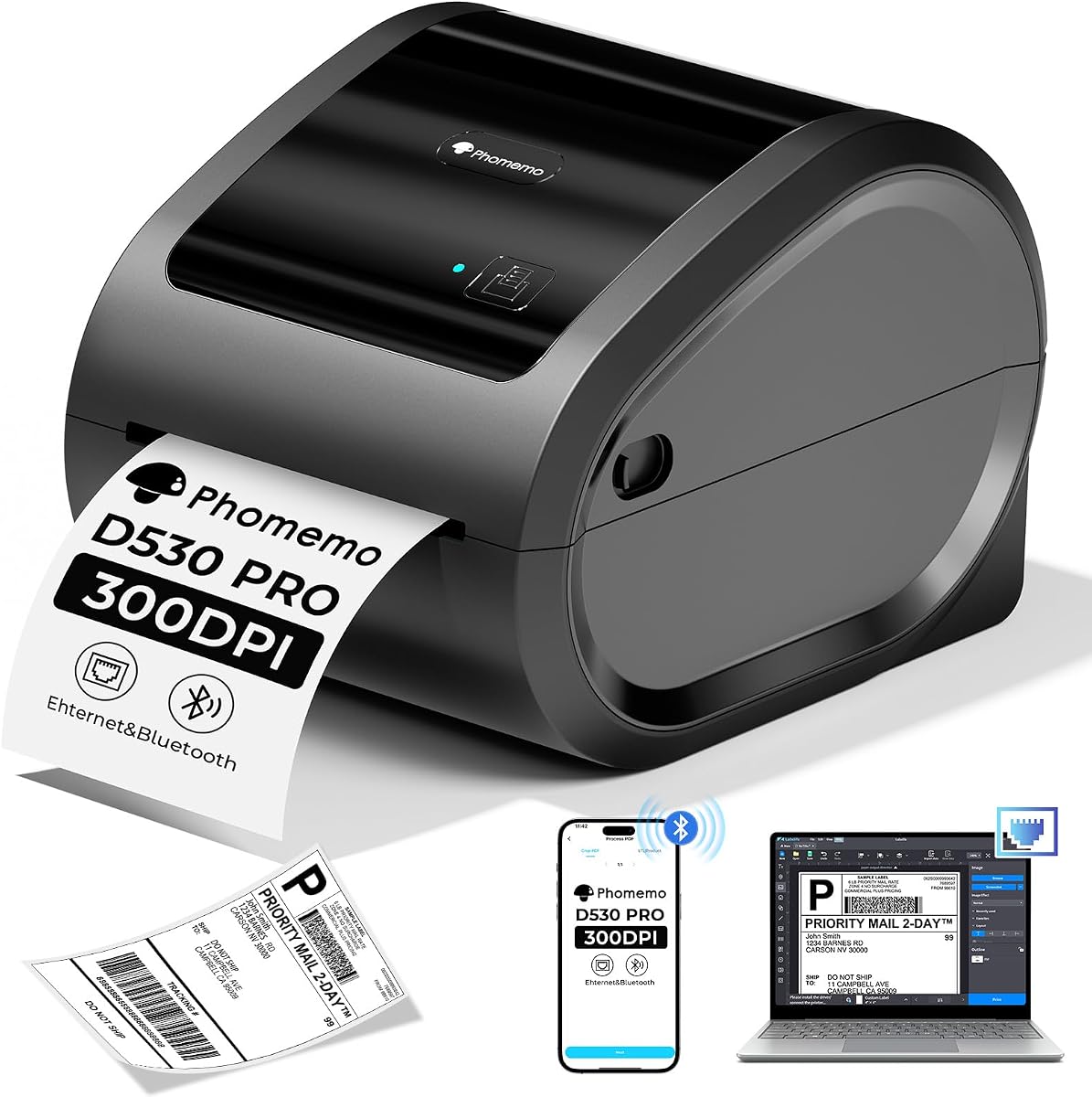
The Phomemo 300DPI Ethernet Thermal Label Printer delivers superior print clarity for detailed labels. With a 4.1 star rating, it balances performance and features well. The 300DPI resolution ensures crisp barcodes and text that are easily readable by scanners.
We may earn a commission when you buy through this link, at no additional cost to you.
It supports Ethernet, USB, and Bluetooth connections offering flexibility for different office setups. The built-in paper bin holds up to 500 rolls reducing clutter and saving space. A unique feature helps save every piece of label paper reducing waste costs.
While the price is higher than basic models, the added features justify the investment for high volume users. The return to paper towel function helps maximize efficiency. Setup might require checking all compatibility which is typical for advanced devices.
This printer is ideal for businesses needing high quality labels and versatile connectivity. It works well with DHL and other major platforms. We recommend it for those prioritizing print quality and operational efficiency.
The 300DPI head delivers sharper images and text than standard 203DPI models.
Built-in bin holds many rolls keeping your workspace organized and tidy.
We may earn a commission when you buy through this link, at no additional cost to you.
The JADENS Bluetooth Thermal Shipping Label Printer offers wireless convenience for various businesses. Its 4.4 star rating indicates consistent satisfaction among users. It uses thermal technology eliminating the need for ink or toner which saves maintenance costs.
We may earn a commission when you buy through this link, at no additional cost to you.
This printer supports both fanfold and roll labels giving flexibility for label choices. It connects via USB for Windows and Mac or Bluetooth for mobile devices using the Jadens printer app. Setup takes about one minute with provided resources.
Mobile users on Android need to download the specific app as Bluetooth printing directly isn't supported on phones. Long pressing the feed button calibrates the label size which might require attention when changing rolls. These are minor trade-offs for the versatility.
Ideal for online small businesses needing flexible label printing options. It works with platforms like Amazon eBay and Shopify. We suggest this model for those wanting wireless features at a moderate price point.
Thermal technology removes the hassle of ink replacements and mess.
Compatible with major marketplaces like Etsy and Easy for broad use.
We may earn a commission when you buy through this link, at no additional cost to you.
The Thermal Shipping Label Printer 4×6 is designed for high volume small business needs. With a 4.4 star rating it delivers efficiency and reliability. Its 150mm/s speed minimizes downtime during peak shipping hours boosting operational efficiency.
We may earn a commission when you buy through this link, at no additional cost to you.
It uses direct thermal technology reducing maintenance costs and eliminating ink toner. The printer supports Bluetooth and USB connections with the FlashLabel Pro app offering customizable templates. Offline capability allows local storage reducing reliance on cloud downloads.
Mobile printing requires the FlashLabel Pro app and works best via USB for steady connections. It prints in black and white which is standard for shipping but limits customization for branding. This is acceptable for shipping logistics primarily.
Perfect for businesses needing quick reliable label printing without extra costs. It works with Amazon, Shopify, and DHL platforms. We recommend this for busy offices needing speed and efficiency in daily tasks.
Prints up to 72 labels per minute keeping your shipping pipeline full.
The FlashLabel Pro app simplifies design and printing with many templates.
We may earn a commission when you buy through this link, at no additional cost to you.
The KNAON Bluetooth Thermal Shipping Label Printer combines speed and portability for versatile use. Its 4.4 star rating reflects user satisfaction with its performance. It features a fast 180 mm/s speed making it ideal for quick shipping needs.
We may earn a commission when you buy through this link, at no additional cost to you.
This model offers a stylish compact design fitting easily on desks or in drawers. The included USB drive comes with drivers and videos for a quick setup. It supports over 3000 templates for various labeling projects beyond shipping.
Mobile users need the FlashLabel Pro app for Bluetooth pairing and printing. Windows devices can print directly via Bluetooth with updated drivers. Changing labels requires manual feed button calibration which can be slightly tedious but manageable.
Great for small businesses needing a multi purpose portable printer. It works with Amazon, eBay, and DHL. We suggest this option for those valuing speed and design in a compact package.
Use thousands of templates for shipping, home organization, or custom labels.
Preloaded USB resources help you start printing right away.
We may earn a commission when you buy through this link, at no additional cost to you.
The MUNBYN Bluetooth Thermal Label Printer offers advanced tech for precise printing. With a 4.2 star rating, it focuses on reliability and ease of use. Its DAC Dynamic Algorithm Tech auto-calibrates to reduce misalignment ensuring flawless labels.
We may earn a commission when you buy through this link, at no additional cost to you.
This printer operates at just 60 dB which is quieter than typing making it great for quiet offices. It supports a 970,000 label lifespan which is six times more than ordinary devices. This engineering reduces waste and maintenance costs.
Connectivity involves Bluetooth indicators showing data transfer status which simplifies troubleshooting. It prints crisp monochrome labels ideal for inventory and shipping. Setup can vary slightly between Mac and Windows but remains straightforward with documentation.
Ideal for offices needing quiet reliable performance. It supports DHL and other major platforms effectively. We recommend this for businesses prioritizing precision and operational calm.
The DAC chip reduces label alignment errors saving time and materials.
Low noise operation ensures it does not disturb quiet environments.
We may earn a commission when you buy through this link, at no additional cost to you.
The Rollo Wireless Shipping Label Printer brings true wireless freedom with Wi-Fi and AirPrint. Its 4.1 star rating shows solid performance for wireless printing. It supports printing directly from iPhone iPad and Mac without needing Bluetooth or drivers.
We may earn a commission when you buy through this link, at no additional cost to you.
It runs at 150mm/s with 203 DPI ensuring clear labels for scanning. The print head life is about 650,000 labels which is four times more than others. The included Rollo Ship Manager app provides exclusive shipping rates efficiently.
Setup requires connecting to Wi-Fi which can be tricky initially but offers great mobility. It works with eBay and DHL platforms. The higher price reflects the advanced wireless capabilities and included services.
Perfect for teams needing flexible remote printing access. We recommend this for offices valuing seamless wireless integration over cost.
Connect via Wi-Fi AirPrint to print from any device in the office.
Access exclusive rates via Rollo Ship Manager without extra platform fees.
We may earn a commission when you buy through this link, at no additional cost to you.
The Nelko Bluetooth Thermal Shipping Label Printer offers a cost-effective solution for daily labeling. Its 4.3 star rating reflects reliable performance. It prints at 150 mm/s with 203 DPI ensuring clear shipping labels and barcodes.
We may earn a commission when you buy through this link, at no additional cost to you.
This printer supports both fanfold and roll labels giving you flexibility in media choice. The compact design requires minimal desk space making it great for small offices. Instruction videos on the U-Disk simplify setup for new users.
Mac users must connect via USB and cannot use Bluetooth. Mobile users need the NELKO app for Bluetooth printing. These limitations are minor given the overall value and speed provided.
Ideal for home offices needing simple efficient printing. Works with Amazon eBay and DHL. We suggest this for budget buyers needing compact reliable performance.
Direct thermal tech and high speed help grow your business faster.
Small footprint keeps your desk organized without sacrificing functionality.
We may earn a commission when you buy through this link, at no additional cost to you.
The DYMO LabelWriter 550 Series provides a specialized option for precise label needs. Its 3.6 star rating indicates mixed user experiences but highlights unique features. It uses automatic recognition to eliminate hassle and optimize printing.
We may earn a commission when you buy through this link, at no additional cost to you.
It works only with authentic DYMO labels which ensures quality but limits media options. The printer uses direct thermal technology removing the need for ink. It prints precise quantities reducing waste and keeping costs manageable.
While proprietary labels can increase long term costs, the design minimizes waste. It lacks broad platform compatibility compared to others which limits shipping flexibility. This is acceptable for specific non-standard labeling tasks.
Suitable for users needing precise quantities and simple operation. We recommend this for those prioritizing brand consistency over shipping flexibility.
Print precise quantities reducing the hassle of sheet labels and waste.
Direct thermal tech ensures efficient printing without extra supplies.
We may earn a commission when you buy through this link, at no additional cost to you.
Choosing the right Dhl label printer requires considering various factors that affect your shipping workflow and costs. This guide outlines key aspects to help you find a model that fits your specific business needs.
Connectivity determines how you can attach the printer to your devices. Look for models supporting USB, Bluetooth, or Wi-Fi depending on whether you need stationary or mobile printing capabilities.
USB offers stable connections while wireless options provide flexibility for printing from phones or tablets. Ensure your chosen model supports your operating system effectively.
Speed affects how quickly you can process orders. High speeds around 150mm/s are ideal for busy businesses. Resolution such as 203 DPI or 300 DPI impacts barcode clarity for scanning.
Faster speeds reduce bottlenecks during peak times. Higher resolution ensures labels are readable which prevents delivery delays due to scanning errors.
Your printer must work seamlessly with your e-commerce and shipping platforms. Check if the printer supports integrations with DHL, Amazon, Shopify, or other services you use regularly.
Compatible printers reduce manual work by allowing direct label downloads and printing. This integration is vital for efficient order management.
Different shipping needs require various label sizes. Ensure the printer supports 4×6 standard shipping labels but also allows wider ranges for other items like return slips or barcodes.
Versatile label support lets you handle different packages without buying separate printers. Look for models that accept both roll and fanfold labels.
High volume shipping requires a durable printer that can run for long periods. Commercial grade printers often have longer print head lifespans reducing replacement costs.
Durable models minimize downtime and ensure consistent performance. Investing in quality build reduces long term maintenance needs.
Consider ongoing costs beyond the initial purchase price. Thermal printers eliminate ink toner but require specific label rolls. Some proprietary systems may force expensive branded labels.
Open systems allowing third party labels save money over time. Always check the cost of compatible consumables before buying.
A printer that is easy to set up saves time. Look for models with clear instructions, included drivers, or helpful apps for configuration.
User friendly features reduce frustration and get you shipping faster. Good customer support is also key for resolving issues quickly.
Extra features like auto-calibration, offline mode, or noise reduction enhance the user experience. These features help streamline workflows and improve accuracy.
Consider what specific features add value to your routine. Sometimes extra tech is worth the investment for efficiency gains.
Start by installing the printer drivers or apps recommended by the manufacturer. Connect your printer to your computer or mobile device via USB, Bluetooth, or Wi-Fi according to the instructions.
Load the thermal labels carefully ensuring they fit correctly within the designated slot. Adjust the label guides to match the width of your labels to prevent jams or misalignment.
Regularly clean the print head with a soft cloth or recommended cleaning solution to maintain print quality. Avoid exposure to direct sunlight or heat which can damage the labels and printer components.
Most thermal printers work with standard third-party labels as long as they match the size and type. However some proprietary brands may recommend their own labels which can increase costs. Check manufacturer specifications to confirm compatibility.
Thermal printers do not require ink or toner which reduces maintenance and ongoing costs. They use heat to print on special paper making them efficient and reliable for high volume shipping tasks.
Yes if you use a printer with Bluetooth or Wi-Fi and support for a mobile app. You can send label files from your phone to the printer wirelessly saving you from needing a computer.
Typically a print head lasts between 100,000 and 600,000 labels depending on usage and model. Commercial grade models often last longer which makes them better for businesses with high daily shipping volumes.
Most Bluetooth printers require specific drivers or apps to connect properly to your devices. While some modern systems allow driver less printing installing official software usually ensures better stability and features.
Wi-Fi printers allow multiple devices to print without cables which improves office flexibility. If you need to print from various computers or mobile devices Wi-Fi connectivity is a valuable feature worth the investment.
Mostly unplug the printer and open the lid to remove the label roll. Gently remove any stuck paper and check the rollers for debris. Refolding the roll carefully ensuring guides are adjusted correctly.
Thermal shipping labels are designed to last for the duration of transit and delivery. High quality labels resist fading so barcodes remain scannable. Avoid exposing labels to extreme heat or moisture to ensure longevity.
We have reviewed ten top Dhl label printers offering a range of options from budget friendly to premium models. The Rollo USB remains a top choice for its commercial reliability while the Rongta provides excellent value for beginners.
When deciding prioritize features that match your shipping volume and connectivity needs. Consider factors like speed and compatibility to ensure the printer integrates smoothly with your existing systems.
Remember that prices and availability change frequently so check current listings before purchasing. Investing in the right printer now will save time and money in your shipping operations.